
Created by Zhanchao Yang
Source ↗
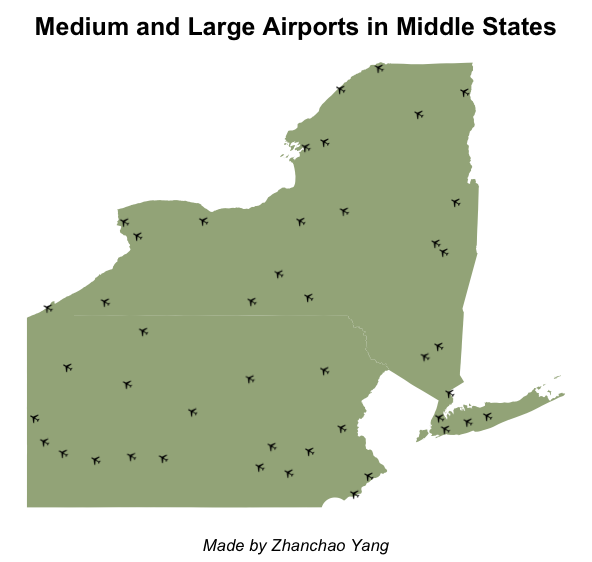
Day 21 (Icons): I created a map showcasing medium and large airports in Pennsylvania and New York using custom plane icons to represent each airport location. This visualization demonstrates the power of iconography in cartography, replacing traditional point markers with meaningful pictograms that immediately communicate the map’s subject matter. The map uses a plane icon sourced from Wikimedia Commons, rendered at each airport location to create an intuitive and visually engaging representation of air transportation infrastructure across these Middle Atlantic states.
Technical Implementation:
- tidyverse - Collection of R packages for data manipulation and visualization
- sf - R package for handling spatial vector data and geometric operations
- tigris - R package for downloading TIGER/Line shapefiles from the US Census Bureau, providing access to state boundary data
- ggplot2 - R’s powerful data visualization package
- ggimage - R package for adding custom images and icons to ggplot2 visualizations
- fontawesome - R package for accessing Font Awesome icons (loaded for potential icon support)
- rsvg - R package for rendering SVG files to raster formats (PNG), enabling the conversion of vector icons to bitmap images suitable for map display
Data Sources:
- Airport Data: OurAirports - Comprehensive database of airports worldwide, updated nightly, filtered for medium and large operational airports in Pennsylvania and New York
- Geographic Boundaries: US Census Bureau TIGER/Line Shapefiles via the tigris package - State boundaries for Pennsylvania and New York (2023)
- Icon: Wikimedia Commons Plane Icon - SVG airplane symbol converted to PNG for map display